I Tried to Get My Open Source Shop Recommended by AI. Did It Work?
AI assistants now browse, compare and rank products for me, so I hardly shop with ordinary search anymore. I upgraded my open source Medusa template to be found by AI and tested it with a real shop. Google, Gemini and Perplexity recommend it. ChatGPT doesn't, yet.


I stopped using Google to look things up years ago. Online shopping, however, was the exception. For a long time, AI assistants were great at answering questions but not very good at finding products, so whenever I needed to buy something, I went back to ordinary search.
That has changed. AI assistants now browse the web live: they open product pages, compare prices and shipping, read customer reviews, and hand me a ranked list of options. So I use ordinary search less and less, for shopping too. I think that is where most people are heading, and probably sooner than we expect. If you're reading this a while from now, it may already be the normal way to shop.
That left me with a question I couldn't ignore. About 800 shops still run on my Medusa template for Railway, and over the years I've written several guides on setting up an online store the open source way, fully independent of the big platforms. If shoppers move to AI, those shops need to be found there, and my template needed an upgrade.
So I spent the last two months finding out whether a fully open source shop, one you own, can get recommended by AI as well as the stores on the big enterprise platforms. I built the upgrade into the template, launched a real shop with it, and handed its product to Google, Microsoft and ChatGPT.
Two months later, the answer is: yes, mostly. Google, Gemini and Perplexity all recommend my product, with the right price and my own photos. ChatGPT doesn't find it yet. And there are a few trade-offs, which I'll get to.
If you'd rather watch than read, here's the whole build as a video:
Overview
- How AI shoppers pick products
- Build on a proven core, seriously
- What's new in the template
- Handing your products to Google, Bing and ChatGPT
- Did it work?
- The trade-offs
- What it costs
- How to try it yourself
- Final thoughts
How AI shoppers pick products
Before building anything, I wanted to understand where an AI gets its product suggestions from. It turns out it looks in two places.
- The web. Your product pages get crawled, just like a search engine does it. Pages that state the price and stock in a format machines can read are much easier for an AI to use, and so is an llms.txt, a plain text summary of your shop written for AI (more on that later).
- Product feeds. A feed is a list of your products that your shop sends directly, with prices, stock and links. It is the cleanest data an AI shopping assistant can get.
There are three places to hand in a feed today:
- Google Merchant Center: free listings, open to any shop with a correct feed. It feeds Google Shopping and Google's AI answers.
- Microsoft Merchant Center: free listings from the same feed. It puts your products into Bing, which ChatGPT leans on for its searches.
- ChatGPT merchants: free to list, but you apply first. For now it is for shops that sell in the US, and approval can take a while.
What I like about this: the free listings can't be bought. You earn them with correct, honest product data, and that is something a template can do for you. So that became the plan for the upgrade: product pages machines can read, an llms.txt, and feeds for all three programs, built in.
Build on a proven core, seriously
These days you could ask an AI to build a webshop from scratch and deploy it for you, and it would probably get you something that works. I wouldn't do it. Not because AI can't write good code, it can, but because e-commerce is full of hard problems that only show up later: payments, taxes, stock, shipping rules, security. For that core, you want something thousands of shops already run on and have tested for you, and let the AI build on top of it. It's a huge head start, and it saves you a lot of time and tokens.
I know that combination works, because I've watched it happen with my own template. Its one real weakness used to be customisation. Being open source, it never had hard limits, but in practice, changing it took a developer. For years I got messages from people who wanted to hire me to customise their shop, or asked whether I could build some kind of visual editor into the template. I even tried that at one point, and concluded it was the wrong path.
Then the messages stopped. For about a year now, not a single person who deployed the template has asked me for help customising it. And I can see why: in the forks of the template on GitHub, there are thousands of commits co-signed by Claude. People simply ask an AI coding agent for the changes they want, on top of a core that already works. The biggest constraint the template ever had has quietly disappeared, and that is a huge win for everyone who runs it.
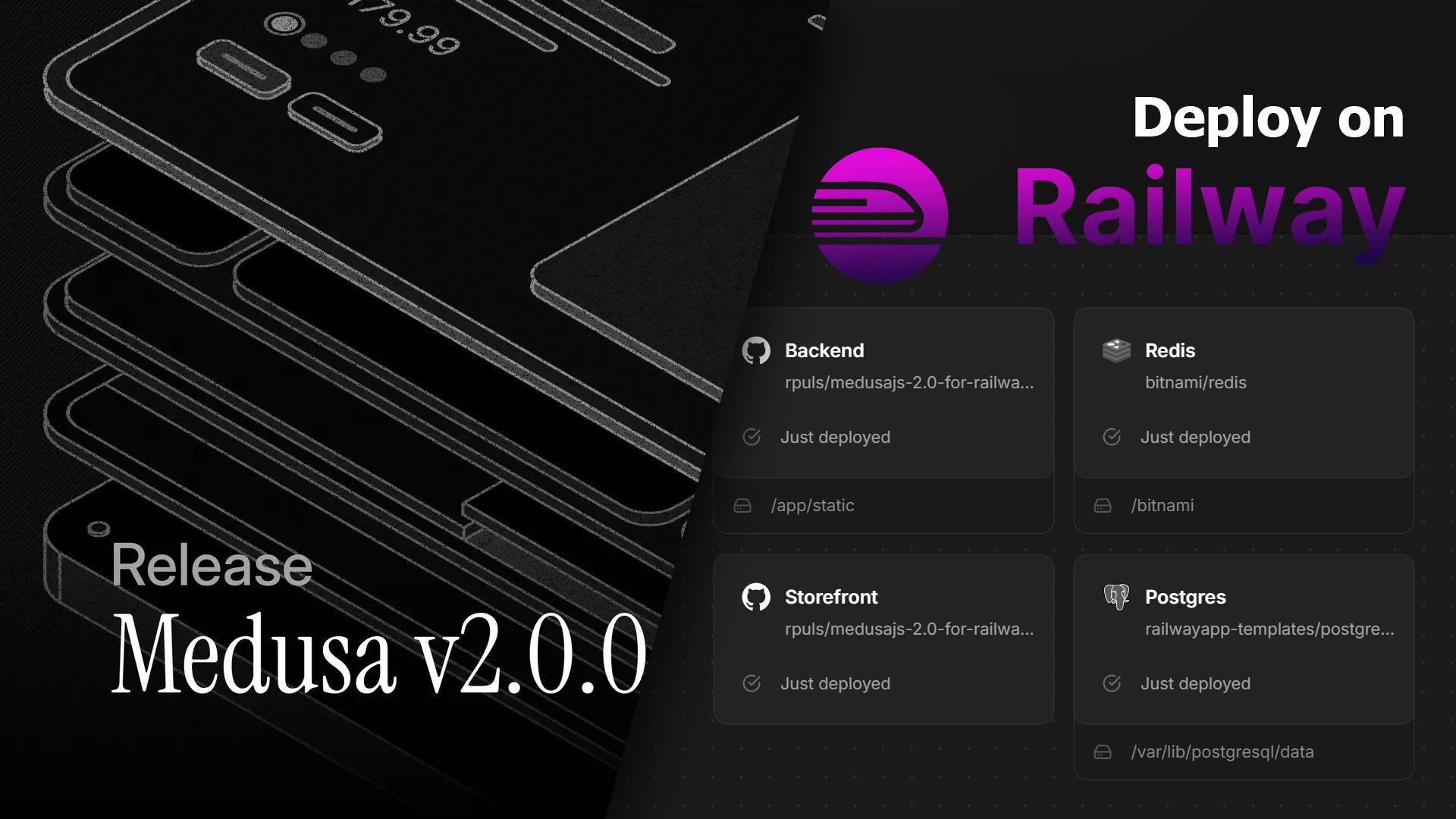
The template runs Medusa, one of the most popular open source e-commerce platforms, on Railway. One click sets up everything a shop needs, already connected: a storefront, the backend with an admin dashboard, a database, file storage for product images, and a search engine. The first deploy takes about ten minutes. If you're new to it, start with my setup guide:
 Rasmus Puls
What's new in the template
This is the biggest update since I started the template in 2024. Here is what each new feature does for you.
Run your shop by chatting with AI
Every shop now has its own MCP server, so AI agents like ChatGPT and Claude can operate it, and the busy work of running a shop becomes a conversation.
Selling to a new country is a good example. Normally that's a region, a currency, a warehouse, shipping and stock, spread over a lot of settings pages. Now it's one sentence, like "I ship from Denmark, and I want to sell to the US." The AI sends a proposal to your admin in plain English, and you click Apply.
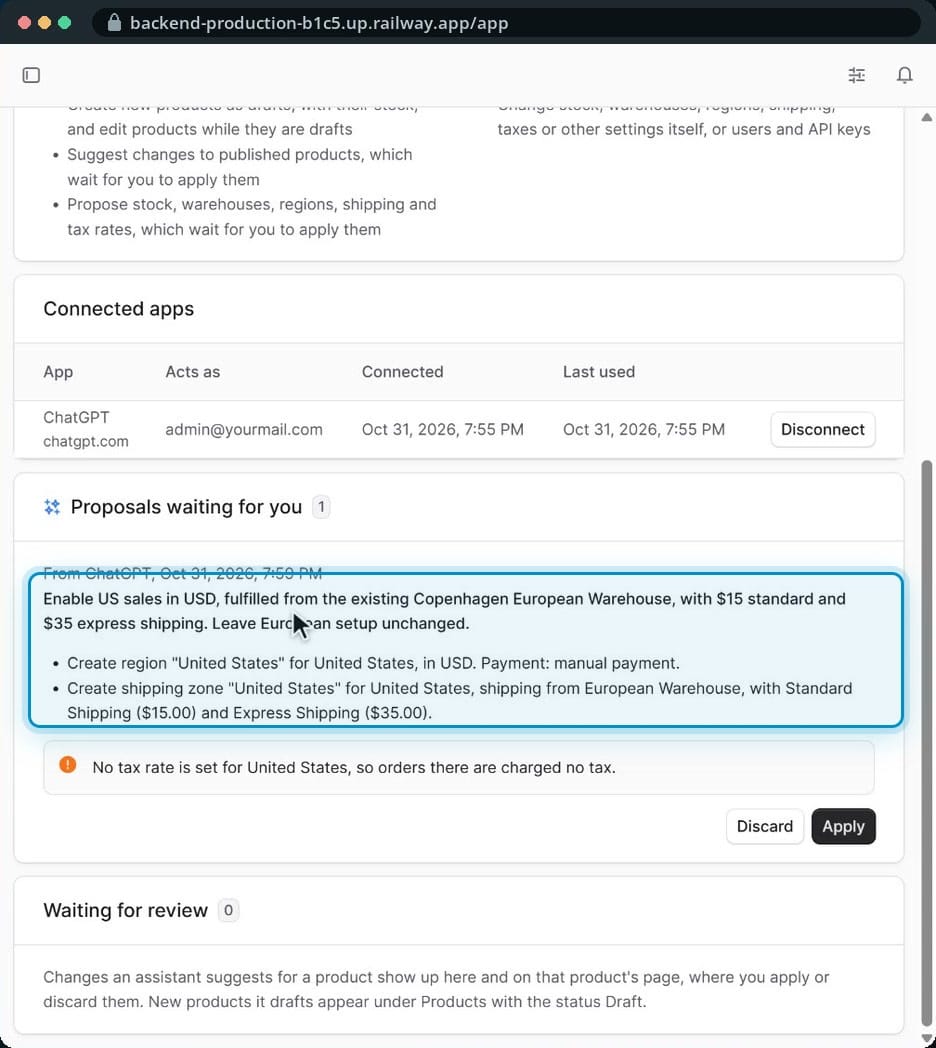
ChatGPT's proposal, waiting in my admin. Nothing changes until I click Apply.
Give it your notes about a new product, and it writes the title, the description, the prices in each currency and the stock, and saves it as a draft for you to check, add photos to and publish.
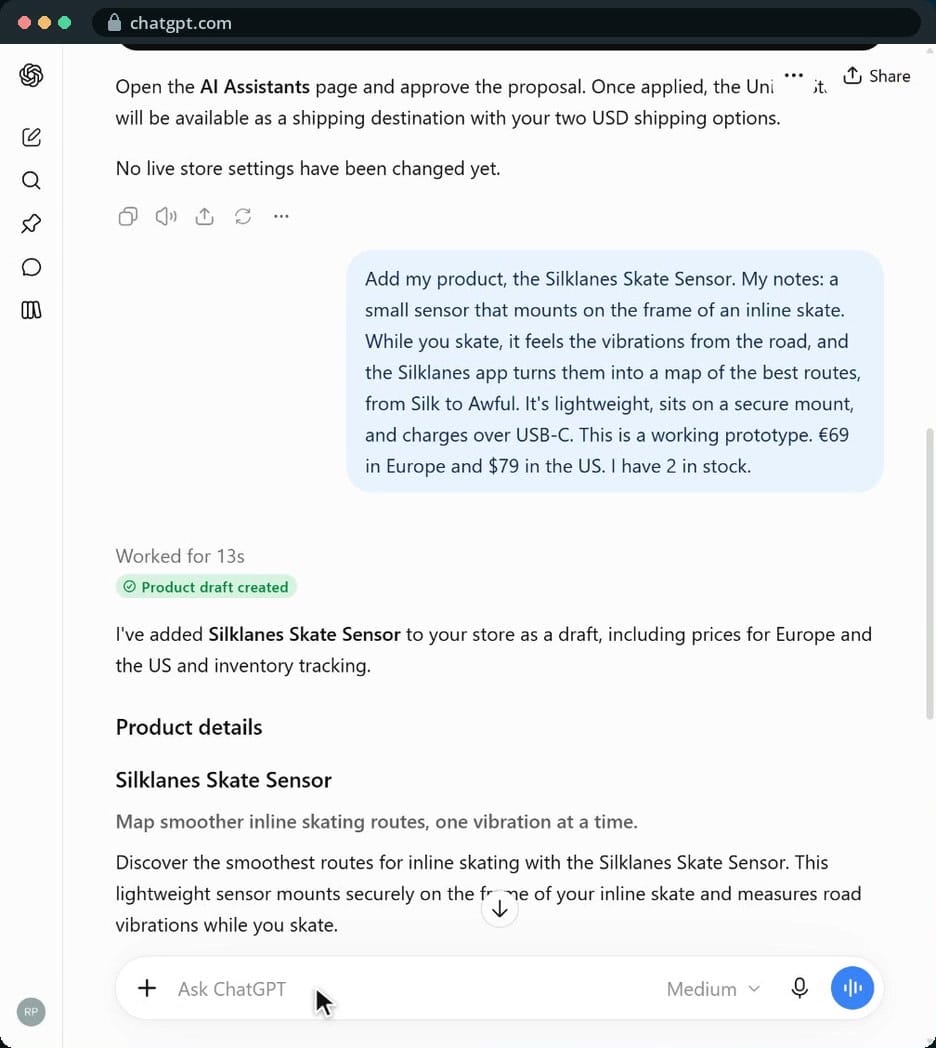
From my notes to a product draft in 13 seconds.
You probably don't want an AI running your shop unsupervised, and neither did I. So the rules are built into the server itself.
The AI can:
- read your products, stock and orders
- create new products, but only as drafts
- propose bigger changes (countries, shipping, stock), which you read in plain English and apply yourself
The AI cannot:
- publish or delete anything
- refund or cancel orders
- change the price of anything already for sale
- see your customers' addresses or payment details
Connecting takes a minute: copy the MCP address from the AI assistants page in the admin, add it to ChatGPT, Claude or another MCP client as a custom MCP server with OAuth, and approve it on your shop's consent page, which lists exactly those rules. One click in the admin cuts an assistant off again.
Medusa has an official MCP server of its own, too: the Medusa MCP, for shops on Medusa Cloud. At the time of writing it is in beta and read-only, so it answers questions about your orders, products and customers. The template's server is part of the shop itself, runs wherever you host it, and can also write drafts and proposals.
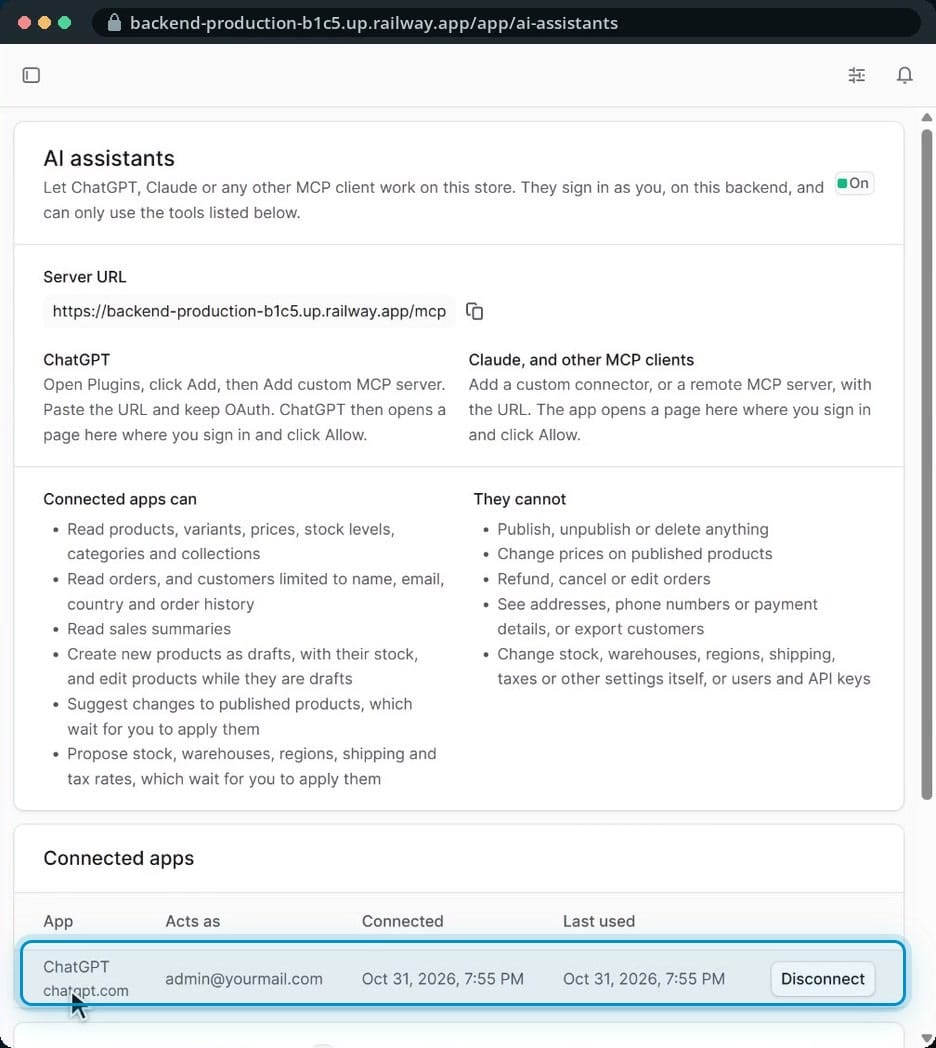
The AI assistants page in the admin, with ChatGPT connected.
Get found by AI shoppers
This is the part the upgrade was really about, and it works on its own, with nothing to set up:
- Product pages AI can read. Every product page carries its price and stock in a format machines understand, so an AI quotes your real price instead of guessing.
- Every product page as Markdown. Add
.mdto any product's address and an AI gets the product as clean Markdown, with its specifications, variant IDs, prices and stock. - llms.txt. Your shop publishes a plain text summary of itself for AI at
your-shop.com/llms.txt, with every product you publish, its price and its options. - Product feeds for Google and ChatGPT.
your-shop.com/feeds/google/us.xml(one per country you sell to) andyour-shop.com/feeds/openai/us.csv, built straight from your catalogue and always current.
Credit where it's due: Medusa's own new storefront starter, dtc-starter, has the first three as well, and the template uses Medusa's code for them where it can rather than reinventing it. The feeds are new.
This is what the llms.txt of my own shop looks like right now (the country list shortened):
# Silklanes

> Silklanes is an online store with 1 product in Merch. It sells to customers in
> Austria, Belgium, … Spain and Sweden, with prices in EUR.

How to shop here:

- To buy, open a product page, choose the options, add it to the cart and check out
  from https://shop.silklanes.com/nl/cart. No account is needed.
- AI agents can also shop through the Universal Commerce Protocol:
  https://shop.silklanes.com/.well-known/ucp describes it, and
  https://shop.silklanes.com/ucp/mcp is an MCP server, with no sign-in, that searches
  the catalogue, builds a cart and starts a checkout. The shopper always pays on this
  site, at the link the checkout returns.
- Each product page is also available as Markdown, with variant IDs, prices and
  stock: add .md to its address.

## Products

- [Silklanes Skate Sensor](https://shop.silklanes.com/nl/products/silklanes-skate-sensor):
  €69.00. Discover the smoothest routes for inline skating with the Silklanes Skate
  Sensor. This lightweight sensor mounts securely on the frame of your inline skate and...
A few details that matter more than they sound. Each item in the feed links to the exact variant on its product page, so the price Google checks on the page is the price in the feed. And if the shop can't read its catalogue for a moment, the feed answers with an error instead of an empty file, because Merchant Center reads an empty feed as "this shop sells nothing" and would delist every product.
For ChatGPT, the shop also uploads its feed to OpenAI every day by itself, once you've been approved and filled in the three OPENAI_FEED_SFTP_* variables.
Make the storefront yours with an AI coding agent
Since so many of you already customise the template with AI, I've made that official: the template now includes an AGENTS.md file, rules written for AI coding agents like Codex and Claude Code, so they know how the shop is put together and what not to break.
Eject the storefront into your own GitHub, hand it to a coding agent, and describe the shop you want, not the code. For my shop, I asked Codex for a launch page instead of a catalogue (one product, one story, one buy button) and attached a design guide. No design guide of your own? Ask any AI chat to write one from a few screenshots of a site you like. Review the pull request like a colleague's work, merge it, and Railway redeploys the storefront. Codex needs a cloud environment for your repository first, which I set up step by step in my Payload CMS 4 video.

The demo storefront after one pull request from Codex. I didn't write any of the code.
Also new, under the hood: file storage now runs on a native Railway bucket instead of MinIO, whose community edition went into maintenance mode. That change had a side effect I didn't plan for: the template got cheaper to run. More on that in What it costs.
The storefront also speaks UCP (Universal Commerce Protocol), the open protocol Google built so AI Mode and Gemini can search a shop and buy on the shopper's behalf. The template's version, taken from Medusa's starter, fills a cart and hands the shopper a link to your own checkout. To be honest, that's future-proofing for now: Google only lets selected merchants in, through a waitlist in Merchant Center and in a few countries, and I haven't been able to test the template against it yet. When the doors open wider, your shop already speaks the language.
Handing your products to Google, Bing and ChatGPT
The template does the technical part, but the merchant programs need to hear from you once:
- Google Merchant Center: create a free account, add your shop, and fill in your business details, the countries you sell to, delivery and returns. Then add your products as a link to your Google feed, fetched daily, so price and stock stay current. Google reviews the shop and the products, which takes a few days.
- Microsoft Merchant Center: the same feed address, and your products go to Bing as well.
- ChatGPT: apply at chatgpt.com/merchants. Once you're approved, OpenAI gives you an upload address and a password for the three variables above.
The forms are much alike, they ask for a lot of business details, and they change often, so just fill in what's true for your shop.
Did it work?
To test it for real, I opened a shop with the upgraded template for Silklanes, another project of mine, which makes a road-surface sensor for inline skates: shop.silklanes.com. About two weeks after launch, I searched like a shopper: a regular one and an AI one.
Google, Gemini and Perplexity all point to my sensor. And they describe it correctly: 1,666 readings a second, road levels from Silk to Awful, 69 euros, with my own photos. All of it straight from my product page. One click, and the shopper is on the product page, ready to buy.
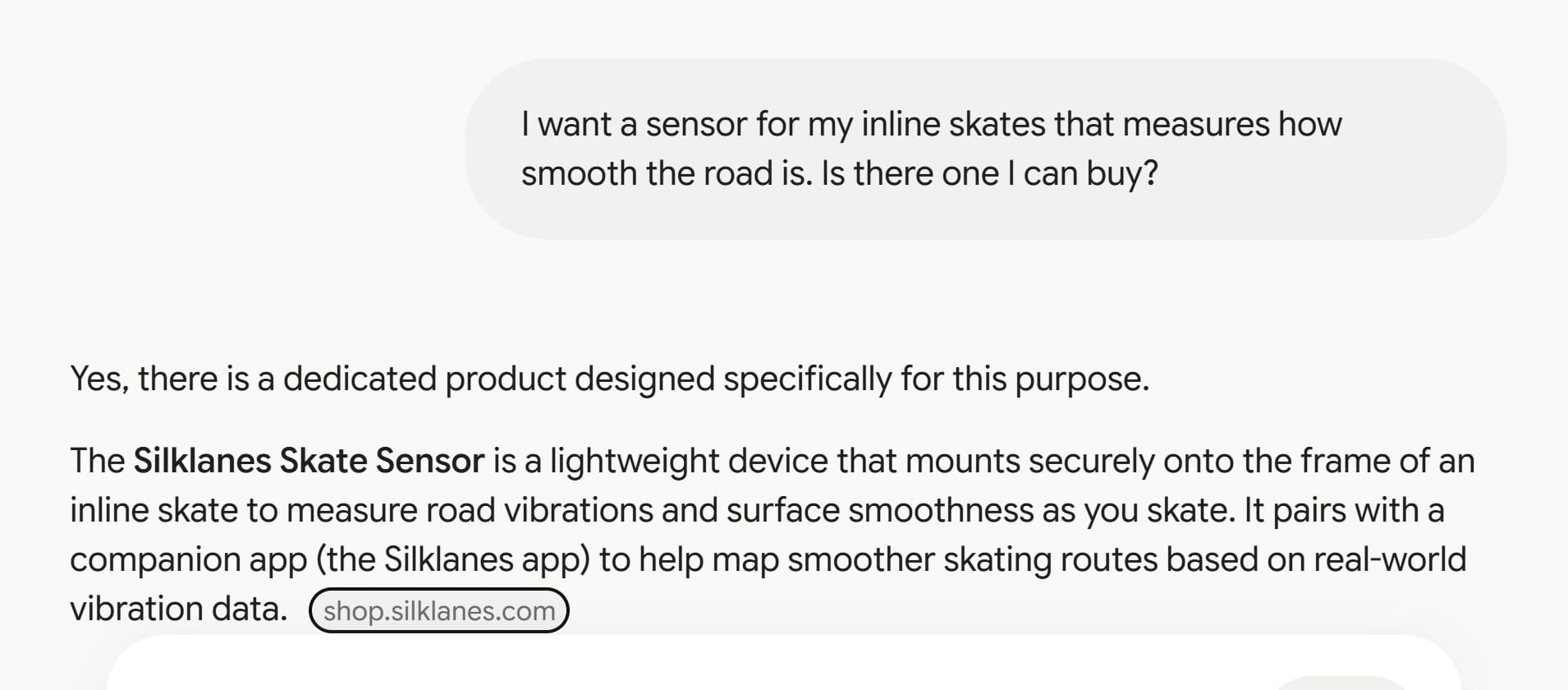
Gemini, asked like a shopper would ask.

Perplexity, with the same answer and the same source.
ChatGPT doesn't find it yet. It leans on Bing for its searches, and Bing hadn't picked up the shop at the time of writing. I'll post an update in the pinned comment on the video when it does.
So yes, a small, fully open source shop on its own domain can show up in AI answers next to the big platforms. Not because it paid for the spot, but because its product data is correct and easy to read.
The trade-offs
- It takes patience. Google reviews the shop and every product, checking that the pages, prices and stock match the feed, and that takes days. It was about two weeks before the AI answers picked my sensor up.
- ChatGPT is the hardest one. You apply first, it is for shops that sell in the US for now, approval can take a while, and even then its search depends on Bing.
- Your product data has to be thorough. The merchant programs want your business details, delivery and returns, and they compare every product in the feed with its page. And an AI can only recommend what it can read: a product page with a clear description, specifications, real photos and the right price gives it plenty to quote, a thin one gives it little to go on. The template takes care of the format, but the content is still yours to write.
- You own it, so you look after it. Hosting grows with your traffic, and updates are yours to apply. That is the price of a shop nobody can take away from you, and I think it's worth it.
What it costs
- Domain: under 10 euros for a year
- Hosting on Railway: about 5 dollars so far this month, around 9 dollars expected for the whole month
- Medusa, the template and the merchant programs: free
- Payment provider: only a fee when you actually sell something
- AI: the ChatGPT plan I already had
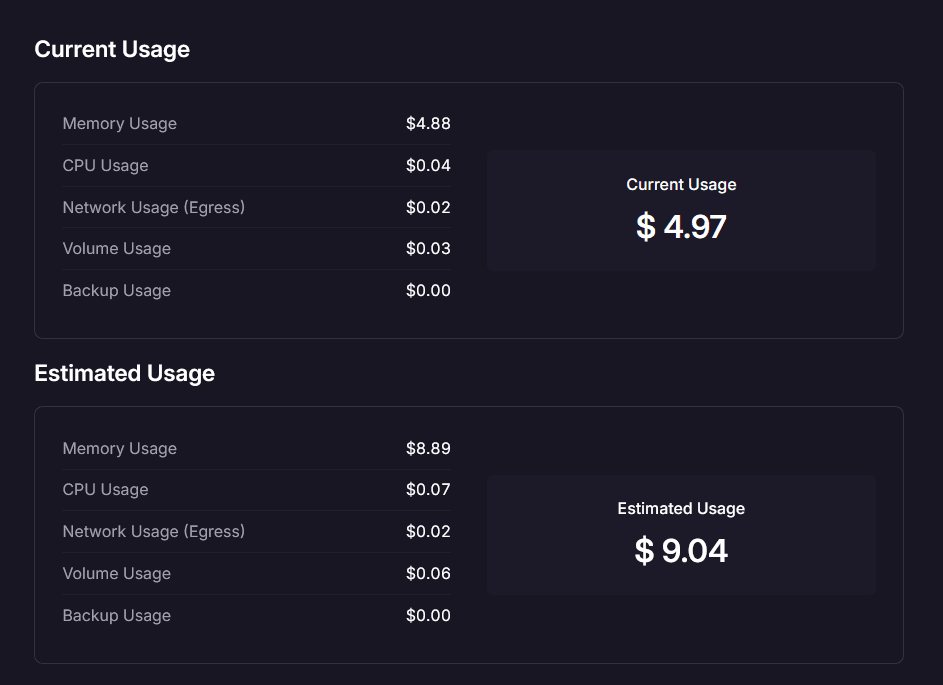
The whole shop on Railway: storefront, backend, database and storage.
To be fair, my shop has only had moderate traffic so far: mostly me, my bots, search engines and AI crawlers. More customers will need more resources.
Rent is up. Groceries are up. Subscriptions, don't get me started. And my 3,000 euro workstation spends its days at 99% of its 16 GB of DDR5, because upgrading the RAM is out of the question 🥲. So here's something you don't hear very often these days: this got cheaper. Medusa can now handle simple search on its own, so a small shop no longer needs MeiliSearch, and the new native storage bucket is a lot lighter than MinIO was. Together, that takes a small shop from close to 20 dollars a month to around 10. A real shop, on its own domain and found by AI, for about the price of a pizza a month. Half the price, and I didn't even have to cancel anything.
If your catalogue is small, dropping MeiliSearch takes two steps: delete the MeiliSearch service and its volume (the volume stays behind otherwise and keeps costing storage), then redeploy the backend. If you sell a lot of products, keep it: it forgives typos, so shoppers find what they're looking for even when they spell it wrong, and a couple of extra sales a month pays for it.
How to try it yourself
Everything above is in the template now. Deploy it, add your own domain in the storefront settings (if your domain is on Cloudflare, Railway sets up the DNS for you), and connect a payment provider: I use Stripe, and covered it in How to add Stripe payments to MedusaJS 2.0.

Already running the template?
If you never ejected, Railway shows an update button on your services. Press it on the Backend first, let it finish deploying, then press it on the Storefront. That's all: the backend migrates the database by itself when it starts, and the new features are on from the first boot.
Add the AI features to any Medusa shop
If you ejected and made the shop your own, a plain merge can collide with your changes. And if your Medusa shop was never built on the template, there is nothing to merge at all. Both are a job for a coding agent. Open your repository in Claude Code, Codex or whichever agent you use, and give it this. It uses the template as a reference and ports what your shop is missing:
Add the AI shopping features of this open source Medusa template to my shop:
https://github.com/rpuls/medusajs-2.0-for-railway-boilerplate, branch master.
Read its AGENTS.md first, then my repository, before changing anything.

If my shop is a fork of that template, merge from upstream instead: the commits
from 027ab29 (Medusa 2.22.1, AGENTS.md, migrations on every boot) up to the
latest master, and everything before that too if my fork is older than 4c4aa59.
Keep my own changes.

Otherwise, port only what my shop is missing, adapted to my code. Check first:
Medusa's own starter (github.com/medusajs/dtc-starter) has the structured data,
the Markdown pages, llms.txt and UCP, and where my shop has Medusa's version, keep it.
- Storefront: product structured data (price and stock), every product page as
  Markdown at its address plus .md, /llms.txt, and product feeds at
  /feeds/google/{country}.xml and /feeds/openai/{country}.csv, one row per variant.
- Backend: the store MCP server (backend/src/store-mcp) with its consent page and
  AI assistants admin page, and the daily OpenAI feed upload
  (backend/src/jobs/push-openai-feed.ts) if I sell through ChatGPT.

Watch for what breaks without a build error:
- The template runs Medusa 2.22.1 on Node 22.22. If my shop is older, tell me
  what the upgrade involves before porting anything that depends on it.
- Since Medusa 2.21 the Store API drops fields outside its allowlist and still
  answers 200: allow them with the allowFields middleware, as AGENTS.md describes.
- A feed's price must match the page its item links to, and a feed that can't read
  the catalogue answers with an error, never an empty file (that delists everything).
- Keep the MCP server's safety model exactly: drafts and proposals only, never
  publishing, deleting, refunds or price changes on live products.
- New routes outside the country prefix (llms.txt, feeds/, .well-known/) must
  bypass my storefront's region redirect, or they 404.
- Never run a bare medusa db:migrate, it can hang waiting for input. Keep every
  @medusajs package on one version and commit the updated lockfile.

Work on a new branch, run the type and lint checks, and open a pull request that
lists what came in, what you adapted, and every conflict you resolved.
Review the pull request and merge it. On Railway, let the backend finish deploying before the storefront; if the storefront comes up first, redeploy it once more. (On the template itself, all of this is the update button.)
Final thoughts
The big e-commerce platforms used to win on support and convenience. They were simply easier to use, and open source was a niche for developers and tech enthusiasts. AI has changed that. I didn't write a single line of code for my shop, and I still got exactly the shop I wanted, maybe even more custom than some of the big platforms would allow.
And the shop is mine. It can move to any other host whenever I want, I can change anything I like, and my data stays mine. Now it can be found by the AI assistants that more and more of us shop with, too. That's why I think open source platforms like Medusa are a big part of the future of e-commerce.
If you love open source and want to be more digitally independent beyond your shop, take a look at my other project, My Own Suite: self-hosting made user-friendly.
Questions about your own shop? Ask in the comments on the video. And if you build something with the template, I would love to see it.
The template is a community template, not made by Medusa, and this article is not sponsored. The deploy link is a referral link: Railway shares hosting revenue with anyone who publishes a template, at no extra cost to you. Medusa is a trademark of MedusaJS, Inc.